TL;DR: Americans are sitting on roughly $23 billion in unused gift cards, with the average person holding about $244 in unspent balances. Tracking gift cards manually is tedious and error-prone. The most reliable method is an automated system that scans your email for gift cards, monitors expiration dates, and sends you alerts before money disappears. Below, we break down four approaches — from basic spreadsheets to AI-powered tracking — so you can pick the one that actually sticks.
You find it in the back of your junk drawer three months too late. Or buried in a confirmation email you archived last November. Or maybe it is still sitting in the envelope from your birthday, tucked inside a greeting card on your nightstand.
It is a gift card. And by the time you remember it exists, the balance has either expired, the store has closed, or you have simply lost track of how much was left on it.
You are not alone. According to a 2024 Bankrate survey, 43% of American adults have at least one unused gift card collecting dust. More than one in three Americans have lost money from a gift card mistake — whether that means letting one expire, physically losing it, or watching a retailer go out of business before they could redeem it.
The frustrating part is not that people do not want to use their gift cards. It is that keeping track of them is genuinely harder than it sounds. Between physical cards in your wallet, e-gift cards in your inbox, store credits scattered across retailer accounts, and travel vouchers you forgot you earned, the organizational challenge is real.
This guide walks through four methods for tracking gift cards, starting with the simplest and ending with the most comprehensive. By the end, you will have a system that fits your life — and a plan to stop leaving money on the table.
Why Tracking Gift Cards Is Harder Than It Sounds
Before diving into solutions, it helps to understand why this problem is so persistent. Gift cards are not like cash in your bank account. They are fragmented by design:
- Physical cards live in wallets, drawers, coat pockets, and kitchen junk drawers
- E-gift cards arrive via email and immediately get buried under newsletters and receipts
- Store credits from returns sit in retailer accounts you rarely check
- Travel vouchers and airline credits hide in booking confirmation emails
- Loyalty rewards convert to spendable balances without any notification
Each one has its own balance, its own expiration timeline, and its own redemption process. There is no single "gift card account" that aggregates everything. And because most gift cards feel like a bonus — money you did not earn from a paycheck — they do not trigger the same urgency as a bill or subscription.
The result? The average unused balance per person climbed to $244 in 2024, up 30% from $187 the year before. Millennials carry an average of $322 in unused gift cards. And collectively, those forgotten balances add up to a staggering $23 billion sitting idle across the country.
Federal law (the CARD Act of 2009) requires gift cards to remain valid for at least five years, and many states like California and New York have even stricter rules. But legal protections do not help if you cannot find the card in the first place.
Let's fix that.
Method 1: The Spreadsheet Approach
Best for: People who have fewer than 10 active gift cards and enjoy manual organization.
The most straightforward way to track gift cards is with a spreadsheet. Open Google Sheets, Excel, or any spreadsheet app and create columns for:
| Store | Card Number (last 4) | PIN | Original Balance | Current Balance | Expiration Date | Source (gift, return, etc.) |
|---|---|---|---|---|---|---|
| Target | ...4829 | 7712 | $50.00 | $23.45 | 12/2028 | Birthday gift |
| Starbucks | ...1190 | — | $25.00 | $25.00 | None | Holiday gift |
| Southwest | — | — | $150.00 | $150.00 | 09/2026 | Cancelled flight |
Pros:
- Free and requires no special tools
- You control the format and what you track
- Easy to share with a partner or family member
- Works for both physical and digital cards
Cons:
- Completely manual — every purchase requires an update
- No automatic expiration reminders
- Card numbers stored in plaintext (security risk if the file is shared or compromised)
- Easy to forget about, especially when life gets busy
- Does not scan email or detect new gift cards automatically
The spreadsheet method works, but only if you are disciplined about maintaining it. For most people, the spreadsheet starts strong in January and is abandoned by March. It requires you to remember to update balances after every use and to periodically check for new cards — which is exactly the kind of friction that causes gift cards to go unused in the first place.
Method 2: Dedicated Gift Card Apps
Best for: People who want a mobile-first solution for managing a moderate collection of gift cards.
Several apps exist specifically for gift card management. Two of the more well-known options are Giftly and Gift Card Guard, along with others like Gyft and Apple Wallet.
What these apps typically offer:
- Manual entry or barcode scanning to add cards
- Balance tracking with visual charts
- Expiration date monitoring
- Barcode storage for quick in-store redemption
- Cloud sync across devices (varies by app)
Giftly, for example, provides barcode support, home screen widgets showing your next expiring card, and iCloud sync for iOS users. Gift Card Guard focuses on verification of card details and initial balance checks, though it is limited to a web-only experience with no native mobile app.
Pros:
- Purpose-built interface that is easier to maintain than a spreadsheet
- Barcode scanning saves time at checkout
- Some apps offer expiration countdown features
- Generally free for basic features
Cons:
- Still requires manual entry for most cards (no automatic email scanning)
- Limited to gift cards only — does not track store credits, travel vouchers, or loyalty rewards
- Many apps are platform-specific (iOS only or web only)
- No SMS or push notification alerts for approaching expirations in most free tiers
- You are trusting a third party with your card data (check their security practices)
- Most do not integrate with your broader financial or household management picture
Dedicated apps are a step up from spreadsheets, but they still rely on you to find and add each gift card manually. If a $50 e-gift card from a holiday purchase lands in your email and you never open it, the app will never know about it.
Method 3: Email Search + Calendar Reminders (The DIY Approach)
Best for: Tech-savvy people who want a free solution using tools they already have.
This method combines email search operators with calendar reminders to create a do-it-yourself tracking system:
- Search your email for gift card keywords: search for terms like "gift card," "e-gift," "store credit," "voucher," "your balance," or "redeem" in your inbox
- Star or label every email that contains a gift card or credit
- Create calendar events for each expiration date, with reminders set 30 days and 7 days before
- Keep a note (Google Keep, Apple Notes, etc.) with a running list of active balances
Pros:
- Completely free
- Uses tools you already have
- Calendar reminders are harder to ignore than a spreadsheet row
- Works across all card types, including store credits and travel vouchers
Cons:
- Time-consuming initial setup (you have to search through months or years of email)
- Easy to miss cards that use unusual language in the subject line
- Calendar reminders require manual creation for every card
- No balance tracking — you have to check each retailer individually
- Breaks down when you receive new cards and forget to add them
- No encryption or security for stored card numbers
The DIY approach is clever, but it is fragile. It works until you get busy, forget to add a new card, or miss a search result because a retailer used "credit toward your next purchase" instead of "gift card."
Method 4: AI-Powered Tracking with The Vault
Best for: Anyone who wants a set-it-and-forget-it system that catches every gift card automatically.
This is where the tracking problem gets genuinely solved, rather than managed.
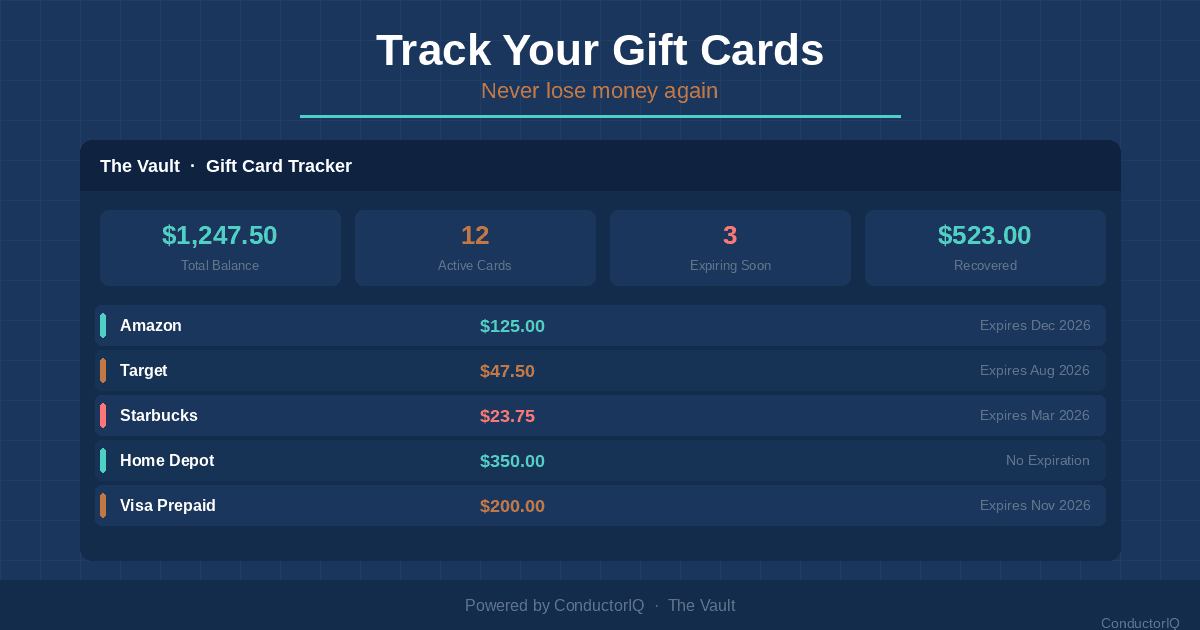
The Vault is a feature inside ConductorIQ that uses AI to automatically find, organize, and monitor gift cards, store credits, travel vouchers, and loyalty rewards — without requiring you to manually enter a single card.
Here is how it works:
- Automatic Gmail scanning detects gift cards, store credits, and travel vouchers as they arrive in your inbox
- AI extraction pulls out the key details: retailer name, balance, expiration date, and redemption code
- Review inbox lets you approve AI-extracted items before they are added, so you stay in control
- Balance and expiration tracking monitors every card in one dashboard
- SMS alerts notify you 30 days, 7 days, and 1 day before any card expires
- AES-256 encryption protects all redemption codes and card numbers (the same standard used by banks and government agencies)
- Barcode and QR code storage lets you pull up any card for quick scanning at checkout
- Voice capture allows you to add physical cards by simply speaking the details aloud
The average ConductorIQ user recovers $1,200 per year in gift cards, store credits, and vouchers that would have otherwise gone unused or expired. That is not hypothetical savings — it is money that was already yours, sitting in your inbox, waiting to be found.
Why this approach is different: Unlike spreadsheets or standalone apps, The Vault does not wait for you to remember to add a card. It proactively scans your email, surfaces cards you did not know you had, and then keeps watch over them until you use them. And because it is part of ConductorIQ's broader household management platform, your gift cards sit alongside your home maintenance schedule, vehicle records, and important documents — everything in one place.
Step-by-Step: Setting Up Gift Card Tracking in ConductorIQ
Getting started takes less than five minutes. Here is how to set up The Vault for automatic gift card tracking:
Step 1: Create Your ConductorIQ Account
Sign up at conductoriq.com and complete the quick onboarding process. You can start with a free trial to explore The Vault before committing.
Step 2: Connect Your Gmail Account
Navigate to The Vault from your dashboard sidebar. Click "Connect Email" and authorize ConductorIQ to scan your Gmail for gift cards and store credits. The connection uses OAuth (the same secure method used when you sign into apps with Google), and ConductorIQ never stores your email password.
Step 3: Review Your AI-Extracted Items
Within minutes, The Vault's AI will scan your inbox and surface any gift cards, store credits, travel vouchers, or loyalty rewards it finds. Each item appears in your Review Inbox with the retailer name, balance, expiration date, and redemption code already filled in. Review each item and tap "Approve" to add it to your tracked collection, or dismiss anything that is not relevant.
Step 4: Add Physical Gift Cards
For cards that are not in your email — birthday gifts, in-store purchases, holiday presents — you have two options:
- Scan the barcode or QR code using your phone's camera to add the card instantly
- Use voice capture to speak the card details (retailer, balance, expiration) and let the AI transcribe them
Step 5: Configure Your Expiration Alerts
Go to your alert preferences and confirm your phone number for SMS notifications. By default, The Vault sends alerts at three intervals:
- 30 days before expiration (a gentle heads-up)
- 7 days before expiration (time to make a plan)
- 1 day before expiration (last chance)
You can customize these intervals or add email notifications alongside SMS.
Step 6: Use Your Cards With Confidence
When you are at a store or shopping online, open The Vault on your phone to see all your active balances. Tap any card to reveal the redemption code or display the barcode for scanning. After you make a purchase, update the remaining balance — or let the AI detect the change on your next email scan.
7 Tips for Maximizing Gift Card Value
Tracking your gift cards is step one. Here is how to squeeze every dollar out of them:
1. Use Gift Cards During Sales Events
A $50 gift card goes further when the store is running a 30% off promotion. Follow your favorite retailers' sale calendars and time your gift card spending accordingly.
2. Combine Small Balances
Many retailers let you apply multiple gift cards to a single purchase. Rather than letting a $3.47 balance sit idle, combine it with other cards or use it toward a larger purchase.
3. Know Your State's Cash-Out Rules
In California, you can redeem any gift card with a balance under $10 for cash. Colorado, Maine, Oregon, and several other states have similar laws with lower thresholds. Check your state's rules — you might be able to convert small balances to cash.
4. Load Digital Cards to Retailer Accounts Immediately
When you receive an e-gift card for a store you use regularly (like Amazon), load it to your account right away. This eliminates the risk of losing the email and makes the balance available the next time you shop.
5. Set a "Gift Card Day" Once Per Month
Designate one day each month to review your balances and plan any purchases. This small habit prevents cards from falling through the cracks.
6. Regift or Sell Cards You Will Not Use
If you have a gift card to a store you never visit, do not let it expire. Resell it on a gift card exchange marketplace or regift it to someone who will actually use it.
7. Check for Inactivity Fees
While federal law restricts dormancy fees, some cards may still charge inactivity fees after 12 months of non-use. Check the terms and conditions printed on the back of each card (or in the original email for e-gift cards) so you are not surprised by a shrinking balance.
Frequently Asked Questions
Do gift cards actually expire?
Under the federal CARD Act of 2009, gift cards cannot expire for at least five years from the date of purchase or the last time funds were loaded. However, some states go further — California and several other states prohibit gift card expiration entirely. The bigger risk for most people is not expiration but forgetting about the card entirely. Store credits and travel vouchers may follow different rules, which is why tracking them is so important.
How much money does the average person have in unused gift cards?
According to Bankrate's 2024 survey, the average American with unused gift cards is sitting on $244 in unspent balances. That number is up 30% from $187 in 2023. Millennials carry the highest average at $322, while Gen Z averages $142. Across the entire U.S. population, the total comes to roughly $23 billion in unused gift cards.
Is it safe to store gift card numbers in an app?
It depends on the app. A basic notes app or unencrypted spreadsheet is not secure — anyone with access to your device or cloud storage could see your card numbers and PINs. Look for solutions that use AES-256 encryption (the industry standard for financial data) to protect your information. ConductorIQ's Vault encrypts all redemption codes and card numbers at rest, meaning even if someone accessed the database, they would not be able to read your data.
Can I track store credits and travel vouchers, not just gift cards?
Most dedicated gift card apps only handle traditional gift cards. Broader solutions like The Vault also track store credits from returns, travel vouchers from cancelled flights, airline credits, hotel reward certificates, and loyalty reward balances. These non-card credits are often where the biggest money hides — a single cancelled flight credit can be worth $200 to $500 or more, and they often have stricter expiration policies than gift cards.
What happens to gift cards when a store goes out of business?
If a retailer files for bankruptcy, outstanding gift card holders become unsecured creditors, which means there is no guarantee you will recover your balance. This is one of the strongest arguments for using gift cards promptly rather than holding onto them. According to Bankrate, 12% of Americans have lost money because a store closed before they could redeem a gift card.
Stop Leaving Money in Your Inbox
The $23 billion sitting in unused gift cards across America is not just a statistic. It is real money — your money — scattered across email inboxes, kitchen drawers, and forgotten retailer accounts.
The good news is that the solution does not have to be complicated. Whether you start with a simple spreadsheet or set up automatic tracking with The Vault, the important thing is to have a system. Any system beats the default approach, which is hoping you remember that Starbucks card exists before it collects enough dust to qualify as a historical artifact.
If you want the path of least resistance, connect your email to ConductorIQ's Vault and let the AI do the searching for you. Most users are genuinely surprised by how much money is hiding in their inbox — and once you see the total, you will never go back to the junk-drawer method.
Related Reading:
- The $23 Billion Gift Card Problem (And How AI Is Solving It)
- 5 Types of Credits Hiding in Your Email Right Now
- Gift Card Tracking Apps Compared: Which One Actually Works?